 landing.fyi
Compare your landings, density altitude on every landing, and night landings
This month is about the conditions you fly in. Put any two sets of your landings side by side and see where the points go, check the density altitude on every landing, and see your night landings called out, with a starry sky when you share one. Your landing review now takes the density altitude and the dark into account too.
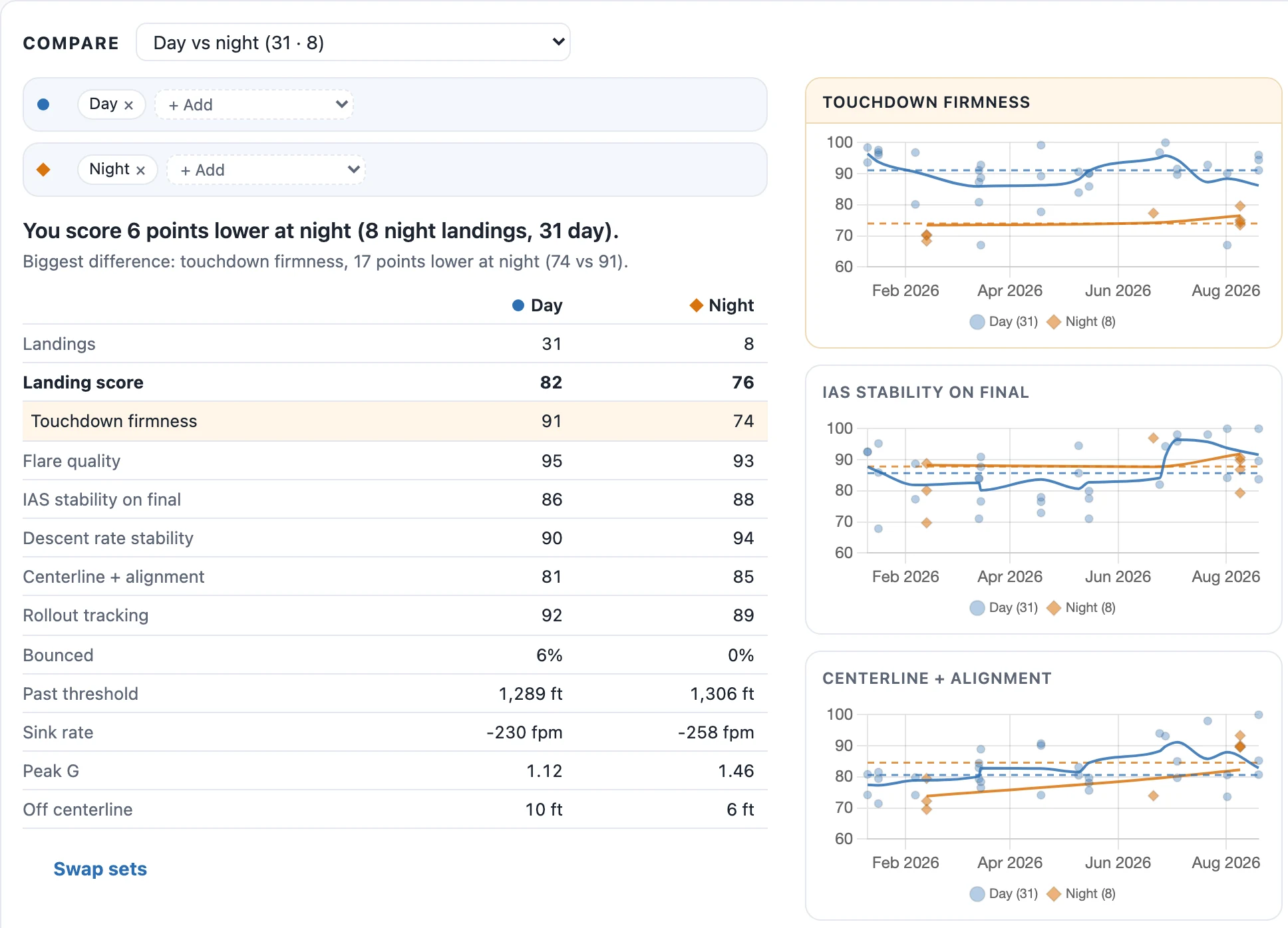
Compare your landings
Put two sets of landings side by side: day against night, steady wind against gusty, home field against away, current against rusty, or any mix you build yourself. You get the gap in one line, the part of your score that moved most, and every chart drawn for both sets. Too few landings on a side? It says so instead of guessing.
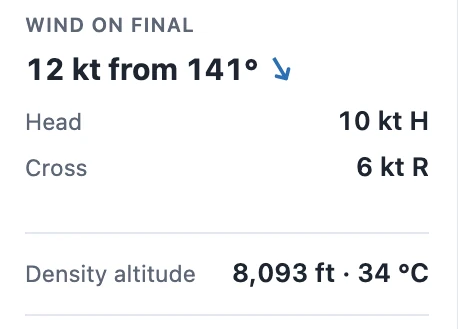
Density altitude on every landing
Each landing now shows the density altitude and outside air temperature it was flown in, from your avionics when it records the temperature, otherwise from the nearest weather station. Your landing review takes it into account, and you can compare cool days against hot ones, or low density altitude against high. Already filled in on the landings you've uploaded.
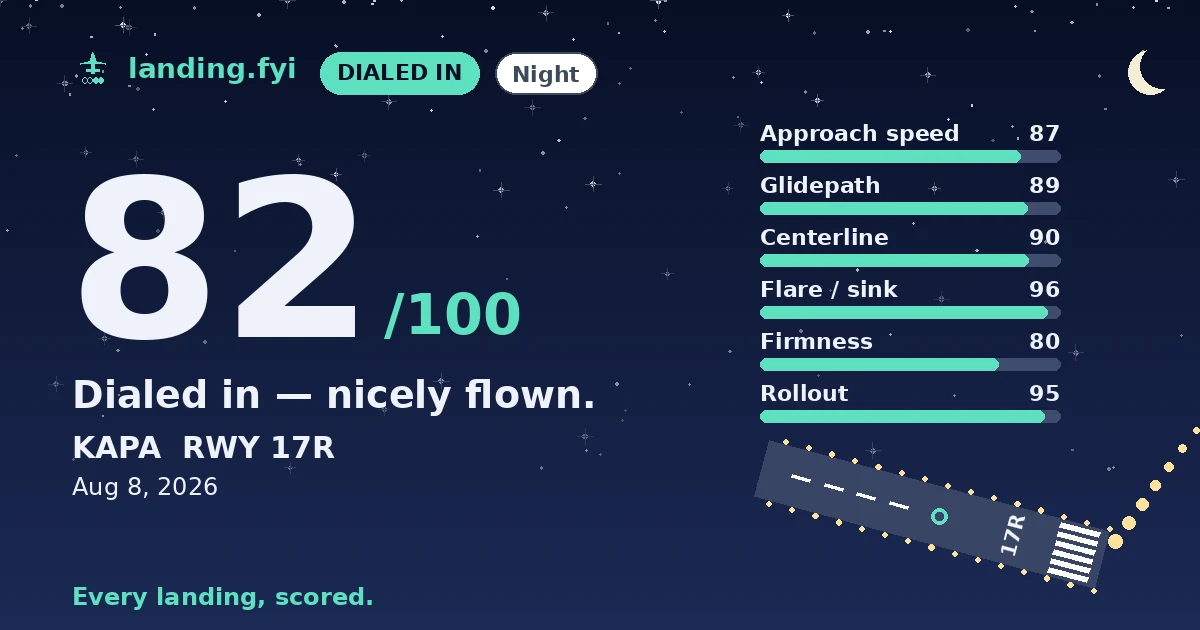
Night landings, called out
A landing after dark is tagged Night, and one at dawn or dusk Twilight, with how long after sunset or before sunrise you touched down, and your landing review knows it too. Share a night landing and its card gets a starry sky. Filter to your night landings, sort darkest first, or compare day against night.
October is the month landing.fyi learns the conditions you fly in
Compare mode sits above the charts on your dashboard. Each comparison in its list shows how many landings you have on each side before you pick it, counted within whatever filters you already have on, so you can narrow to your home field first and then compare day against night just there. Every chart draws both sets at once, one as blue dots and one as orange diamonds, each with its own trend line and median. Each landing in the list is tagged with the set it belongs to, Swap sets turns the comparison around, and the comparison lives in the page address, so you can bookmark one you want to keep an eye on.
Here's where the lines fall. Rusty is a landing after two weeks or more without one, and current is within a week of your last. Your home field is the airport you've landed at most, and a first visit is your first landing at a field. Morning is before noon and afternoon runs to 5 pm, in local time. A short runway is under 3,000 feet, a high field 5,000 feet or more, and gusty is the same line as the Gusting tag on a landing. Each set is judged by its middle landing, not its average, so one bad day can't swing it.
To go beyond the ready-made list, choose Build your own at the bottom of it and add conditions to each side: a strong crosswind at home against a strong crosswind away, or hot afternoons against cool mornings. The same conditions work as ordinary filters too. Open More under Filters and sort to narrow the whole dashboard to, say, only the landings you made after time off.
Density altitude uses the temperature from the ten seconds either side of touchdown, which typically lands within half a degree of the field's own weather report. If your avionics don't record temperature, which is common when no probe is fitted, we use the nearest weather station within 20 nautical miles and 1,000 feet of the field's elevation, corrected for the height difference and matched to the time you landed. Those can take a little while to appear after an upload, and when no station is close enough the card shows a dash. It never changes your score. It's there so you can see why a landing felt the way it did: on a hot, high day the same indicated airspeed means a faster true airspeed and groundspeed, and that shows up as a longer float and a longer roll. Your landing review reads it too, and brings it up only when it explains something that landing shows, like a long float or a firm arrival; below about 3,000 feet it stays quiet.
Night means the sun was more than 6 degrees below the horizon, the end of civil twilight, which is the definition used for logging night time. In the US, night currency for carrying passengers starts an hour after sunset, later than that, so a Night tag on its own doesn't mean a landing counts toward it. We work it out from where and when you touched down, which is why it's already on every landing you've uploaded. Your landing review knows too, and weighs the dark only where it matters, in your flare and touchdown, so a clean night arrival gets a nod rather than a lecture. Your monthly recap now counts night landings among its signature moments, starting with the next one. The Darkest first sort appears once you have a night or twilight landing, and a shared night landing's page shows the same sky as its card.
A few more things while we were at it. Installed as an app from Chrome or Edge, landing.fyi opens in its own window with its own icon, straight to your dashboard, and it stays signed in because it shares your browser's sign-in; Add to Home screen on an Android phone does the same. An iPhone or iPad home-screen app keeps its own sign-in, separate from Safari, which is why tapping the emailed link used to sign in Safari instead. Its sign-in page now has an Email me a code button, and the 6-digit code shows up above the keyboard ready to fill. And if you want to show a friend, send them to landing.fyi/demo: no account needed, it opens a sample pilot's dashboard with 39 landings over eight months (pattern work at home, a trip away, two night sessions and a few layoffs), so they can try every score, trend, comparison and landing review before they sign up.